


Saudi Arabia
Land in Saudi Arabia Ready to Work - Instant eSIM Data
Instant eSIM QR code by email. Activate before your flight. Prepaid 5G/4G in Saudi Arabia - no roaming charges, no SIM queues, no downtime.






Take a look at our promotion's terms and conditions. Terms and Conditions.
Check your device Compatibility

Check if Your Phone is Compatible with eSIM in Saudi Arabia



Don't take our word for it
Don't Just
Travel
Live the Experience!

Personalized 5-Day Itinerary
Perfectly designed to make every moment unforgettable.

Premium Lounge Booking
Book in advance (up to 6 months early) and relax before your flight.

Fast Track Airport Check-In
No queues. No waiting. Save hours and start your trip stress-free.

Installation Guide
How to Install Commbitz eSIM inIOS
Step
01
Open Settings
Open settings and look for Mobile ServicesStep
02
Go to Cellular
In mobile Services see Add eSIMStep
03
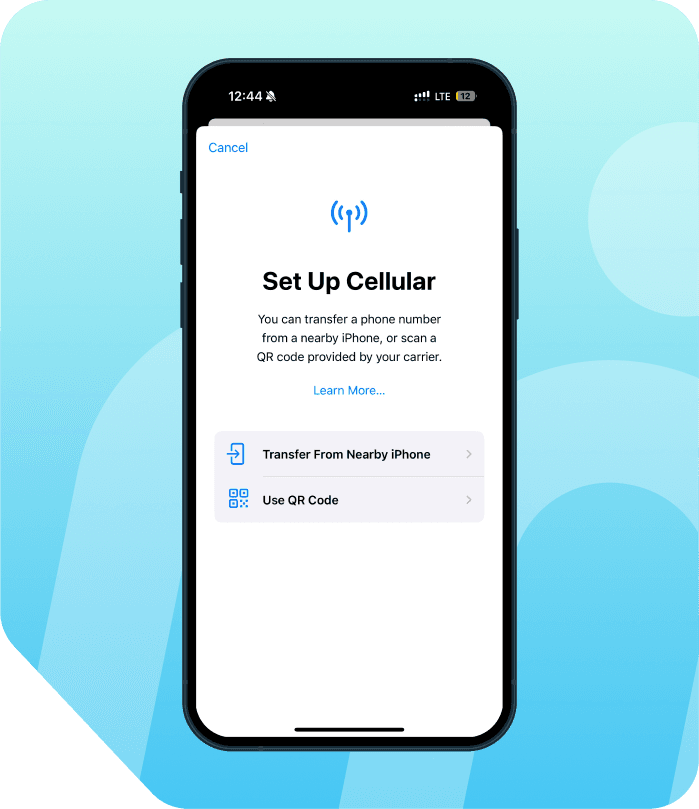
Set Up Cellular
In setup mobile service USE QR codeStep
04
Open Photos
Open photos and look scan QR code of the esim

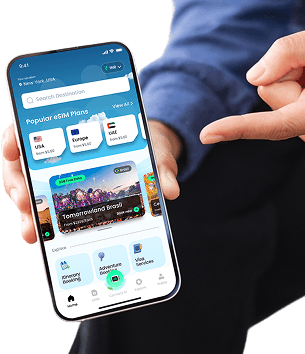
Here's a perfect 5-day Itinerary for your trip!
Tap to explore day-by-day plans & local tips

Get 10% OFF
Download Our App Now!
Enjoy instant savings when you buy eSIMs through our app.


Simple Process
How to activate your Saudi Arabia eSIM
From purchase to connected in under 5 minutes.
01
Choose your Saudi Arabia eSIM plan
Browse prepaid 5G/4G eSIM plans for Saudi Arabia. Select the data size and validity that best matches the length of your trip.
02
Pay & receive your QR code
Complete checkout in seconds. Your Saudi Arabia eSIM QR code is delivered instantly to your email inbox — no waiting, no shipping.
03
Scan & install in 2 minutes
Open your phone's eSIM settings and scan the QR code before you fly. No SIM card, no tools, no store visit needed.
04
Land in Saudi Arabia, stay connected
Your eSIM activates automatically when you arrive. Full 5G/4G data from the moment you land — no SIM swap, no roaming bills.
Why Commbitz
Why choose Commbitz?
Trusted by travelers worldwide for instant eSIM delivery and reliable coverage in Saudi Arabia.
Instant QR code delivery
Your Saudi Arabia eSIM arrives in your inbox seconds after payment. No shipping, no delays — buy today, travel tomorrow.
No SIM swap required
Keep your existing SIM active. Your eSIM runs alongside it — two connections, one device, zero hassle.
Prepaid, zero surprise bills
Pay once for exactly the data you need in Saudi Arabia. No roaming charges, no contracts, no hidden fees.
5G/4G network coverage
Connected to Saudi Arabia's best available network — 5G where live, 4G/LTE everywhere else. Reliable data across the country.
Activate before you board
Install your Saudi Arabia eSIM at home before your flight. Land connected from the very first second — no setup at the airport.
Works on 600+ devices
Compatible with all eSIM-ready smartphones — iPhone XS and later, Samsung Galaxy S20+, Google Pixel 3+, and more.
Frequently Asked Questions
About eSIMs forSaudi Arabia
A Saudi Arabia eSIM (embedded SIM) is a digital SIM card that gives you instant mobile data access when traveling in Saudi Arabia - no physical card, no store visit, no SIM swapping required.
Unlike a traditional SIM, an eSIM is a small chip built directly into your phone. It stores your carrier's information digitally, and you can activate it in minutes by simply scanning a QR code.
With Commbitz Saudi Arabia eSIM: • Purchase your plan online in seconds • Receive a QR code instantly via email • Scan to install - stay connected the moment you land in Saudi Arabia
An eSIM works by digitally storing your carrier's profile directly on a chip inside your device - eliminating the need for a physical SIM card.
Here's the process: 1. You purchase a Saudi Arabia eSIM plan on Commbitz.com 2. A QR code is sent to your email 3. You scan the QR code - your phone downloads the carrier profile 4. The eSIM activates automatically when your phone connects to a network in Saudi Arabia
The eSIM standard is developed by GSMA and supported worldwide. It allows your device to switch between carriers without ever touching a physical card. You can even store multiple eSIM profiles and switch between them.
The fastest way to check eSIM compatibility:
Dial *#06# and press call If you see an EID number (a long digital ID), your phone supports eSIM
Alternatively: • iPhone: Go to Settings → General → About → scroll down to find 'EID' • Android / Samsung: Settings → About Phone → Status → EID
Compatible devices include: • iPhone XS, XR, and all newer models (iPhone 11 through 16 series) • Samsung Galaxy S20 and newer, Z Fold, Z Flip series • Google Pixel 3a and all newer Pixel models • Most Android smartphones released from 2020 onward
Tip: If you see 'Add eSIM' or 'Add Data Plan' in your Mobile Data settings, your device is eSIM-ready.
Activating your Commbitz Saudi Arabia eSIM is simple and takes under 5 minutes:
Step 1: Purchase your Saudi Arabia eSIM plan on Commbitz.com Step 2: Receive your QR code instantly via email (arrives within seconds) Step 3: Open your phone's settings: • iPhone: Settings → Mobile Data → Add Data Plan → scan QR code • Samsung/Android: Settings → Connections → SIM Manager → Add eSIM → scan QR code Step 4: Your phone downloads the eSIM profile automatically Step 5: Enable the eSIM when you land in Saudi Arabia - your data activates on its own
You do not need to be in Saudi Arabia to install the eSIM. Scan and install it before your trip so you are connected the moment you arrive.
To activate your Saudi Arabia eSIM on iPhone:
1. Go to Settings → Mobile Data 2. Tap 'Add Data Plan' or 'Add eSIM' 3. Select 'Use QR Code' and point your camera at the QR code from your Commbitz email 4. Tap 'Continue' on the confirmation screen 5. Label the plan (e.g., 'Saudi Arabia Data') and tap 'Done' 6. Set the eSIM as your default for mobile data
For iPhone 14 and later (US models without physical SIM tray): You can store up to 8 eSIMs and use 2 simultaneously.
For iPhone XR, XS, and 11–13 series: You can store multiple eSIMs but only use 1 eSIM + 1 physical SIM at the same time.
Note: If you cannot scan the QR code, tap 'Enter Details Manually' and type the SM-DP+ address and activation code from your Commbitz email.
To activate your Saudi Arabia eSIM on Android (Samsung, Google Pixel, and most Android phones):
Samsung Galaxy: 1. Go to Settings → Connections → SIM Card Manager 2. Tap 'Add Mobile Plan' or 'Add eSIM' 3. Scan the QR code from your Commbitz email 4. Follow the on-screen prompts to confirm installation 5. Enable the eSIM and set it as default for mobile data
Google Pixel: 1. Go to Settings → Network & Internet → SIMs 2. Tap '+' or 'Add SIM' 3. Scan the QR code 4. Tap 'Activate' to complete installation
Other Android devices: Look for SIM settings under Settings → Network → Mobile Network → Add SIM/eSIM, then scan the QR code.
Tip: Ensure your phone is connected to Wi-Fi during installation. Turn off your physical SIM's mobile data to avoid roaming charges after your eSIM is active.
We recommend installing your Saudi Arabia eSIM before you leave home.
Why install early: • You need a stable Wi-Fi or data connection to download the eSIM profile • Installing at home means you land in Saudi Arabia already connected - no airport Wi-Fi hunting • You can troubleshoot any issues from home rather than at the airport
Does early installation waste data? No - the Saudi Arabia eSIM data plan only starts counting when you first use data in Saudi Arabia. Installing the eSIM in advance does not consume your allowance.
What if I haven't installed before landing? Most major airports in Saudi Arabia have free Wi-Fi - you can install immediately after landing. The process takes under 2 minutes.
No - your home SIM card and phone number remain completely active alongside your Commbitz Saudi Arabia eSIM.
An eSIM works as a second line on your device (dual SIM). Your setup will be: • Home SIM: active for calls, texts, and as your regular number • Commbitz Saudi Arabia eSIM: active for mobile data in Saudi Arabia
To avoid accidental roaming charges: → Set Saudi Arabia eSIM as default for 'Mobile Data' → Keep your home SIM set to 'Voice & SMS' only → Turn off 'Data Roaming' on your home SIM in settings
This way you continue receiving calls on your home number while using fast local eSIM data - with zero roaming charges on your home plan.
Commbitz Saudi Arabia eSIM plans are fully prepaid - no hidden charges, no monthly billing, no roaming surprises.
Plans are available in different tiers based on your trip length and data needs: • Short trips (1–3 days): Starter data plans • Standard trips (5–14 days): Mid-range data bundles (5–15 GB) • Long stays / heavy users (15–30 days): High-data or unlimited plans
All plans include: ✓ Prepaid data (no surprise bills) ✓ 5G / 4G LTE speeds on top local networks ✓ Instant QR code delivery by email ✓ Hotspot / tethering support (most plans)
Check current plan pricing and availability on the Commbitz Saudi Arabia eSIM page - prices vary by destination and data volume.
Buying a local SIM in Saudi Arabia sounds simple - until you actually arrive. Here's why Commbitz eSIM is the smarter choice:
❌ Local SIM: • Long airport queues to buy and register a SIM • Passport checks and documentation requirements • Risk of low-quality or tourist-targeted plans • Must swap out your home SIM (and lose your number temporarily) • No way to set up before you land
✅ Commbitz eSIM: • Purchase in 2 minutes before you leave home • Connected the moment you land - no queues, no paperwork • Keep your existing home number active alongside eSIM data • No SIM swapping - nothing to lose or damage • Instant 24/7 support if anything goes wrong
For most international travelers, eSIM is simply the faster, safer, and more convenient option.
Yes - Commbitz Saudi Arabia eSIM supports mobile hotspot (tethering) on most plans, allowing you to share your internet connection with a laptop, tablet, or other devices.
How to enable hotspot with Saudi Arabia eSIM: • iPhone: Settings → Personal Hotspot → toggle on, select the eSIM line as the source • Android: Settings → Connections → Mobile Hotspot → enable, select the eSIM
Important notes: • Hotspot data is counted from your main data allowance • Some unlimited plans may have fair-use limits on hotspot speeds • Check the specific plan details before purchase for hotspot availability
Hotspot is especially useful for travelers who also need connectivity on a laptop, camera, or secondary phone.
Yes - if you run out of data or your plan expires during your trip, you can easily top up without visiting any store.
How to top up: 1. Visit Commbitz.com from your phone (connect to hotel Wi-Fi if needed) 2. Purchase a new Saudi Arabia eSIM plan 3. The new plan is applied to your existing eSIM - no new QR code needed in most cases
Your eSIM stays installed on your device throughout your trip, so getting more data is as quick as a 2-minute purchase. Connection stays uninterrupted.
Tip: If you're a heavy data user, consider buying a higher-data plan upfront - it's usually more cost-effective than multiple top-ups.
Yes - Commbitz Saudi Arabia eSIM connects to the leading local mobile networks in Saudi Arabia, providing reliable 4G/5G coverage across cities, major towns, tourist areas, and key transport routes.
Coverage highlights: • Major cities and urban areas: Excellent 5G/4G coverage • Tourist destinations and resorts: Reliable 4G coverage • Highways and main transport routes: Good 4G coverage • Very remote rural areas / mountains / jungles: Coverage may be limited
This is consistent with all local carriers - remote wilderness areas have limited coverage everywhere, not just on eSIM. For all tourist destinations, beaches, and city experiences in Saudi Arabia, you will have reliable connectivity.
We recommend downloading offline maps (Google Maps, Maps.me) for areas you plan to explore off the beaten path.
WiFi is available in hotels, cafés, and shopping areas across Saudi Arabia - but it has real limitations for travelers:
Problems with relying on WiFi only: • Not available outdoors, on transport, or in rural/coastal areas • Public WiFi is often slow, unreliable, or requires login steps • Security risks on public networks (especially for banking or email) • No connectivity for navigation when you need it most - on the move
With a Commbitz Saudi Arabia eSIM, you get: • Always-on personal 4G/5G data wherever you go • Secure private connection - not shared with strangers • Real-time maps, ride-hailing apps, and translation tools work anywhere • No searching for WiFi passwords at every stop
For most travelers in Saudi Arabia, a personal eSIM is far more practical than WiFi-only.
Commbitz Saudi Arabia eSIM plans are data-only - they do not include a local Saudi Arabia phone number or traditional voice/SMS minutes.
What this means for calls: • You cannot make or receive regular local calls using the eSIM • However, you can make and receive calls using internet-based apps over your eSIM data: - WhatsApp calls and messages ✅ - FaceTime Audio/Video ✅ - Google Meet, Zoom, Teams ✅ - Skype and other VoIP apps ✅
• Your home SIM remains active for incoming calls and texts on your regular number
For most travelers, internet calling over eSIM data is more than sufficient - and in many cases better quality than traditional roaming calls.
eSIM transfer policies vary by plan and carrier. Here's what you need to know:
In general: • Once an eSIM QR code is scanned, it can usually only be used ONCE - it cannot be re-scanned on a second device • Deleting an eSIM from your phone may permanently remove it - you cannot reinstall using the same QR code
Best practices: • Do NOT delete your Saudi Arabia eSIM unless you are sure you no longer need it • If you switch phones during or before your trip, contact Commbitz support - a new QR code may be issued • Do NOT perform a factory reset while your eSIM is active if you want to keep it
If you change phones before your trip, contact Commbitz support BEFORE deleting the eSIM for guidance on transferring your plan.
Yes - this is an important step to avoid unexpected roaming charges from your home carrier.
Recommended settings once your Saudi Arabia eSIM is active:
iPhone: 1. Go to Settings → Mobile Data 2. Tap on your home SIM (Primary line) 3. Turn off 'Data Roaming' 4. Set Commbitz Saudi Arabia eSIM as 'Default for Mobile Data'
Android / Samsung: 1. Settings → Connections → SIM Card Manager 2. Select your home SIM → turn off 'Mobile Data' 3. Enable mobile data on your Commbitz eSIM
Your home SIM stays active for calls and texts - only its data roaming is turned off. You save money, and your eSIM handles all data in Saudi Arabia.
Don't worry - eSIM activation issues are rare but easy to resolve. Try these steps:
1. Check your camera focus: Hold the phone steady 6–8 inches from the QR code and wait for it to auto-focus 2. Enter details manually: Your Commbitz email also includes an SM-DP+ address and activation code - tap 'Enter Details Manually' in your SIM settings instead of scanning 3. Check Wi-Fi connection: You must be connected to Wi-Fi to download the eSIM profile 4. Restart your phone and try again 5. Make sure Carrier Lock is disabled: If your phone is locked to a specific carrier, it may not accept a new eSIM - contact your home carrier to unlock
If none of these work: • Contact Commbitz support via WhatsApp or email - our team is available 24/7 • A replacement QR code can typically be issued within minutes